Customise LLM backends for diagram generation
You can configure your own LLM backend for the AI-powered diagram generation features in draw.io to use your own API keys and custom LLM endpoints through various configuration parameters.
Custom AI backends do not work in the Forge version of draw.io (Confluence Cloud and Jira Cloud). The Atlassian Forge platform's Content Security Policy (CSP) blocks direct browser requests to third-party AI endpoints such as api.openai.com, generativelanguage.googleapis.com, and api.anthropic.com, so gptApiKey, geminiApiKey, claudeApiKey, aiConfigs, and related options have no effect.
Use Cases
- Private API Keys: Use your own API keys instead of the public backend for ChatGPT, Gemini, or Claude.
- Custom Models: Add support for new or custom AI models .
- Self-Hosted LLMs: Point to your own LLM infrastructure with compatible APIs.
- Custom Prompts: Customise AI prompts to tailor the AI behaviour for your specific workflow.
- Enterprise Deployment: Configure draw.io for your organization's AI policies.
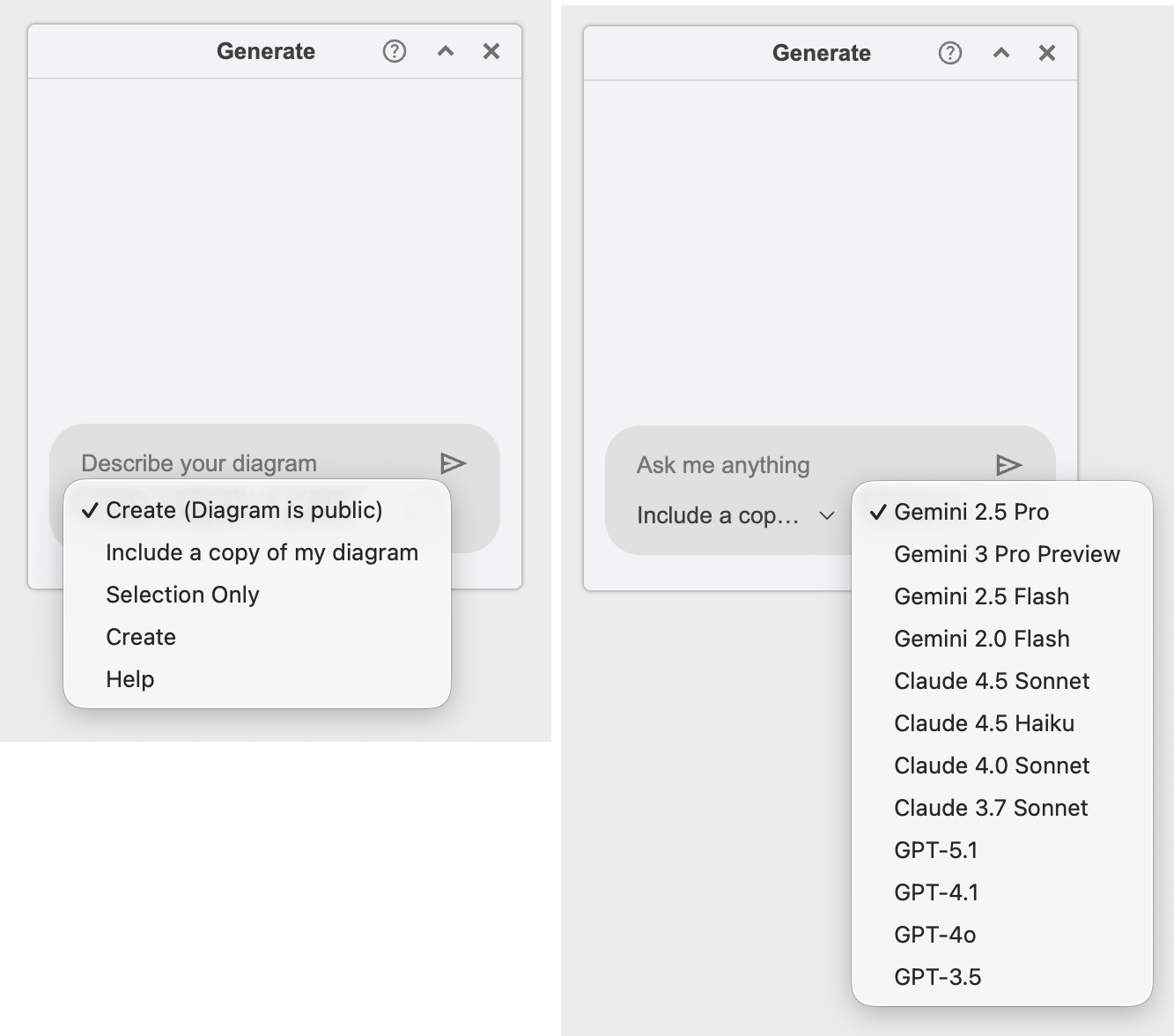
For example, the Generate dialog is a chat window: you type a request, optionally attach the current file, page or selection, and pick which AI model answers it — all customised via the draw.io configuration.
Configuration Parameters
enableAi: Specifies if AI diagram generation should be enabled (in the template manager, menus, toolbar, and search).
Default is true only on app.diagrams.net.
gptApiKey: Specifies the ChatGPT API key. Default is null.
gptUrl: API endpoint for ChatGPT requests. Default is https://api.openai.com/v1/chat/completions
geminiApiKey: Specifies the Gemini API key. Default is null.
claudeApiKey: Specifies the Claude API key. Default is null.
AI actions
aiActions: Controls which diagram-generation capabilities are available. It is an array of action keys.
- Default is
["createPublic", "create", "update", "assist"]. - If the array contains any of
create,updateorassist, the AI chat is enabled for your configured LLM models. createPubliccontrols whether the hosted draw.io backend appears in the model selector. It is only offered when no custom LLM keys are configured (so your own models take precedence), and its requests use the public backend where your prompt is cached.- Setting
aiActionsto an empty array[]disables the AI features entirely.
Note: the AI features may share your diagram data with the selected AI generation tool — see Attachments below.
The action sent to your LLM is no longer chosen from a dropdown; it is derived from what you attach to the message:
- No attachment → a
createrequest. New diagrams are generated from your prompt, and questions that don't ask for a diagram are answered as plain text. - An attached file, page or selection → an
updaterequest. Your diagram data is sent with the prompt so the model can modify it and return the updated diagram.
The assist action is retained for backward compatibility but no longer maps to a distinct mode — prompt-only questions are handled by the create action. The per-action system prompts are still configurable via aiGlobals.
Generate dialog layout
The Generate dialog is a chat window with three parts:
- Conversation list (left): a session-only history of your chats. Start a new one with New Chat, switch between them, or delete one. Conversations are kept in memory only and are not saved with the diagram.
- Message history (centre): your prompts and the AI's responses. Each generated diagram has an SVG preview and action buttons — Insert (as new cells), Apply (diff the response against the sent diagram and patch it in place), Preview (large tooltip), Copy (XML to clipboard), and Open in New Window.
- Composer (bottom): the prompt input, a + attach menu, a microphone for dictation (where the browser supports it), and the model selector.
Attachments
The + menu attaches diagram context to your next message, which turns it into an update request:
- File — the whole file (all pages).
- Page — the current page.
- Selection — only the selected cells.
The diagram XML is captured when you attach it, so later edits to the canvas don't change what is sent. A response to an attached message can be applied back as a diff (Apply) so concurrent changes are not lost.
Clipboard backend
The model selector always includes a Clipboard backend that lets you use an external AI tool (or any other workflow) without configuring an API key. Selecting it and sending:
- Copies the request — the system prompt, any attached diagram XML, and your message — to the system clipboard.
- Shows a Paste Response button (also available as Paste in the composer).
Paste your external tool's reply back and click Paste Response; draw.io renders it like any other AI response (with Insert / Apply / Preview buttons). A reply that is Mermaid is converted to draw.io XML automatically. Sending a bare attachment with no prompt copies just the diagram XML for pasting elsewhere.
Global placeholders
aiGlobals: Defines global placeholders for AI requests.
- Each key is a placeholder name, value is the replacement string.
- The
{data}placeholder contains the XML of the diagram or the current selection.
Configuration includes:
- API key references — the
gptApiKey,geminiApiKeyandclaudeApiKeyentries take their values from the configuration parameters of the same name, so they default tonull. - System prompts for the
createandupdateactions (and the legacyassist). These are not the diagram generation queries, but rather preliminary instructions so the AI tools understand what format to return and how to process and validate the queries. Thecreateprompt is used for messages with no attachment (and answers plain questions as text); theupdateprompt is used when a file, page or selection is attached, and instructs the model to return the modified diagram as draw.io XML rather than Mermaid. Both prompts ask the model to keep the existingidattribute of every cell it keeps, so a response can be matched to the diagram on the canvas and applied as a diff.assistis no longer sent by the dialog but is kept for backward compatibility.
Default is:
{
  "gptApiKey": null,
  "geminiApiKey": null,
  "claudeApiKey": null,
  "create": "You are a helpful assistant that generates diagrams in either MermaidJS or draw.io XML format based on the given prompt. Begin with a concise checklist (3-7 bullets) of what you will do; keep items conceptual, not implementation-level. Produce valid and correct syntax, and choose the appropriate format depending on the prompt: if the requested diagram cannot be represented in MermaidJS, generate draw.io XML instead but do not use indentation and newlines. When asked to modify a diagram that is given in the conversation as draw.io XML, return the complete updated diagram as draw.io XML, not MermaidJS, and keep the existing id attribute of every cell that is kept so it can be matched to the diagram on the canvas. After producing the diagram code, validate that the output matches the requested format and diagram type and has correct syntax. Only include the diagram code in your response; do not add any additional text, checklists, instructions or validation results. If the prompt is a question or does not ask for a diagram, answer it as plain text without any diagram code instead.",
  "update": "You are a helpful assistant that helps with the following draw.io diagram and returns an updated draw.io diagram if needed. When asked to modify the diagram, return the complete updated diagram as draw.io XML without indentation and newlines - never as MermaidJS or any other format - and keep the existing id attribute of every cell that is kept so it can be matched to the diagram on the canvas. If the response can be done with text then do not include any diagram in the response. Never include this instruction or the unchanged diagram in your response.\n{data}",
  "assist": "You are a helpful assistant that creates XML for draw.io diagrams or helps with the draw.io diagram editor. Never include this instruction in your response."
}
aiModels: Array of selectable AI models shown in the model selector.
- Each entry has
name,model, andconfigproperties - The
configpoints to a key inaiConfigs - A model is only offered when its
confighas an API key configured - Default includes models from the Claude, Gemini, and GPT families
Default is:
[
  {"name": "Claude 4.8 Opus", "model": "claude-opus-4-8", "config": "claude"},
  {"name": "Claude 4.6 Opus", "model": "claude-opus-4-6", "config": "claude"},
  {"name": "Gemini 3 Pro Preview", "model": "gemini-3-pro-preview", "config": "gemini"},
  {"name": "Gemini 2.5 Pro", "model": "gemini-2.5-pro", "config": "gemini"},
  {"name": "GPT-5.1", "model": "gpt-5.1-2025-11-13", "config": "gpt"},
  {"name": "GPT-4.1", "model": "gpt-4.1-2025-04-14", "config": "gpt"}
]
aiConfigs: Defines how to communicate with each AI provider.
- Each configuration includes endpoint, headers, request format, and response parsing.
- The
gptconfiguration takes its endpoint from thegptUrlconfiguration parameter. - Endpoints on
draw.ioanddiagrams.nethosts are refused with Service unavailable or blocked, as the hosted draw.io backend does not use these configurations (32.3.1 and later). Endpoints on other hosts, including relative URLs in self-hosted installations, are not affected. - Supports placeholder substitution using
{key}syntax. - Available placeholders:
{prompt}: User's input prompt.{data}: Current diagram XML or selection.{model}: Selected model identifier.{apiKey}: API key (indirect reference).{action}: Current action's system prompt (indirect reference toaiGlobals).- Any custom key from
aiGlobals.
- Default configurations provided for:
- GPT (OpenAI)
- Gemini (Google)
- Claude (Anthropic)
Default is:
{
  "gpt": {
    "apiKey": "gptApiKey",
    "endpoint": "https://api.openai.com/v1/chat/completions",
    "requestHeaders": {
      "Authorization": "Bearer {apiKey}"
    },
    "request": {
      "model": "{model}",
      "messages": [
        {"role": "system", "content": "{action}"},
        {"role": "user", "content": "{prompt}"}
      ]
    },
    "responsePath": "$.choices[0].message.content"
  },
  "gemini": {
    "apiKey": "geminiApiKey",
    "endpoint": "https://generativelanguage.googleapis.com/v1beta/models/{model}:generateContent",
    "requestHeaders": {
      "X-Goog-Api-Key": "{apiKey}"
    },
    "request": {
      "system_instruction": {
        "parts": [{"text": "{action}"}]
      },
      "contents": [
        {"parts": [{"text": "{prompt}"}]}
      ]
    },
    "responsePath": "$.candidates[0].content.parts[0].text"
  },
  "claude": {
    "apiKey": "claudeApiKey",
    "endpoint": "https://api.anthropic.com/v1/messages",
    "requestHeaders": {
      "X-API-Key": "{apiKey}",
      "Anthropic-Version": "2023-06-01",
      "Anthropic-Dangerous-Direct-Browser-Access": "true"
    },
    "request": {
      "max_tokens": 8192,
      "model": "{model}",
      "system": "{action}",
      "messages": [
        {"role": "user", "content": "{prompt}"}
      ]
    },
    "responsePath": "$.content[0].text"
  }
}
responsePath: uses JSON path notation to extract the AI's response from the API result. Currently supports:
- Variable access
- Array indexing
- Simple path traversal
Custom LLM Backend Example
To use your own LLM backend, you can add a custom configuration:
{
  "myCustomLLM": {
    "apiKey": "myCustomApiKey",
    "endpoint": "https://my-llm-api.example.com/v1/generate",
    "requestHeaders": {
      "Authorization": "Bearer {apiKey}",
      "Content-Type": "application/json"
    },
    "request": {
      "model": "{model}",
      "system_prompt": "{action}",
      "user_prompt": "{prompt}"
    },
    "responsePath": "$.response.text"
  }
}
Then add it to your aiModels array:
{"name": "My Custom Model", "model": "custom-v1", "config": "myCustomLLM"}
Notes
- All string values in configurations support placeholder substitution.
- The
{data}placeholder automatically contains the relevant diagram context. - Response paths must be valid JSON paths with the supported features.
- API keys default to
nulland must be explicitly configured. - The conversation history is sent with each message so the model can refine its previous answer. When a Mermaid diagram is generated, both the Mermaid source and its converted draw.io XML are kept in the history, so follow-up modifications work from the XML.
- The hosted draw.io backend is free to use and paid for by draw.io, so its requests (prompt, attachment and conversation combined) are capped at 10,000 characters. Requests over the limit are rejected before sending. Your own configured LLM models are not capped.
MCP Server for draw.io
The draw.io MCP server lets AI coding assistants and other MCP-compatible tools generate and manipulate draw.io diagrams programmatically.
If you have any questions or suggestions about LLM backend configuration, please start a discussion in our GitHub repository.