Present a diagram to everyone who has it open
When you collaborate in real time, you can present the diagram to everyone who has the same diagram file open. Their editors will follow your view: the page, the part of the diagram you see and the zoom. If you open presentation mode or the Explore viewer, they will see it too.
This works with diagram files stored in Google Drive or OneDrive, when real-time collaboration is enabled.
Present to everyone
- Open the shared diagram file in draw.io.
- Select Extras > Present to Everyone from the menu. In the Simple editor theme, select View > Present to Everyone.
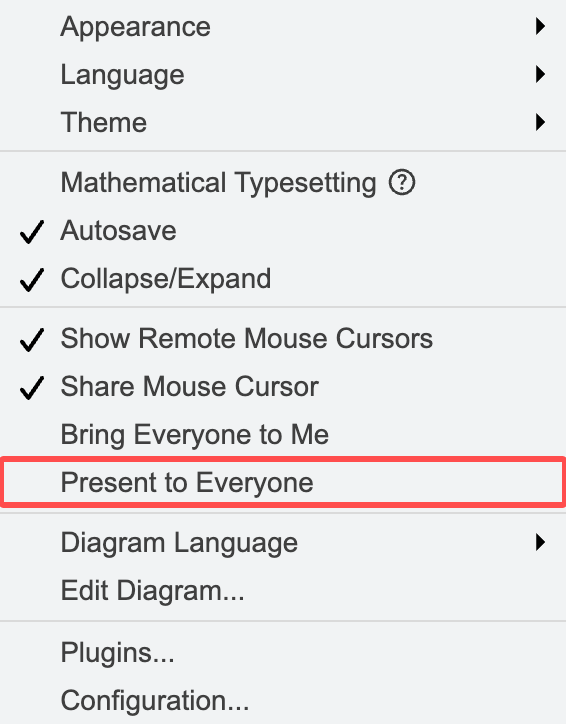
A Presenting to everyone message will be shown. Your collaborators will see a message that you are presenting, and their view will follow yours when you change the page, scroll or zoom, select a shape or use the laser pointer.
To stop presenting, select Present to Everyone again. Your collaborators will see a Presentation ended message.
Note: A collaborator leaves your presentation when they scroll, zoom or click in the diagram themselves. They will follow you again the next time you start presenting. Make sure your collaborators are aware they should not interact with the diagram during the presentation to avoid this.
Share presentation mode and the Explore viewer
While you present to everyone, your collaborators see the same views as you.
- Presentation mode: When you select File > Publish > Presentation Mode, presentation mode will open for your collaborators too. They see the same page and the same part of the diagram, and the shape you highlight with a click.
- Explore viewer: When you open the Explore viewer, it will open for your collaborators too. They see the same shape in the centre, the same levels of connected shapes and zoom, and the shapes you highlight.
- Laser pointer: When you switch on the laser pointer in presentation mode, your collaborators see the red dot at the same point in the diagram, without your name.
When you close presentation mode or the Explore viewer, it will close for your collaborators too.
Bring everyone to your view once
Select Extras > Bring Everyone to Me to move all collaborators to your current page and view once. In the Simple editor theme, select View > Bring Everyone to Me. Your collaborators won't follow your view afterwards.