Org Chart layout
Select Arrange → Layout → Org Chart… to arranges shapes as a top-down organisation chart.
Unlike the more generic tree and organic layouts, this layout is purpose-built for org charts. Every connector is read as reports to, and the chart type controls how the shapes reporting to the same parent are stacked beneath it.
None of the common layout options available to the other layout types are available to Org Chart layouts. Connector styles will not be altered.

Org Chart layout options
Org Chart Type — how direct reports are arranged below their parent:
- Linear — all direct reports are placed side by side in a single row. Clear, but wide for large teams.
- Hanger 2 — direct reports hang below the parent in rows of at most two, either side of a vertical stem.
- Hanger 4 (default) — direct reports hang below the parent in rows of at most four, either side of a vertical stem.. A good compromise between width and depth.
- Fishbone 1 — direct reports are stacked in two columns along a single vertical spine. Compact for parents with many reports that have no reports of their own.
- Fishbone 2 — like Fishbone 1, but the reports are split across two spines side by side, halving the depth.
- Single Column Left / Single Column Right — all direct reports are placed in one vertical column to the left / right of the stem.
- Smart — picks a shape per branch based on its size: small or leaf-only teams stack in a single column, larger leaf-only teams use a fishbone, and branches containing several sub-managers use Hanger 4.
Parent Child Spacing (default 20) — the vertical distance in pixels between a shape and the row(s) of shapes reporting to it.
Sibling Spacing (default 20) — the distance in pixels between shapes that share the same parent.
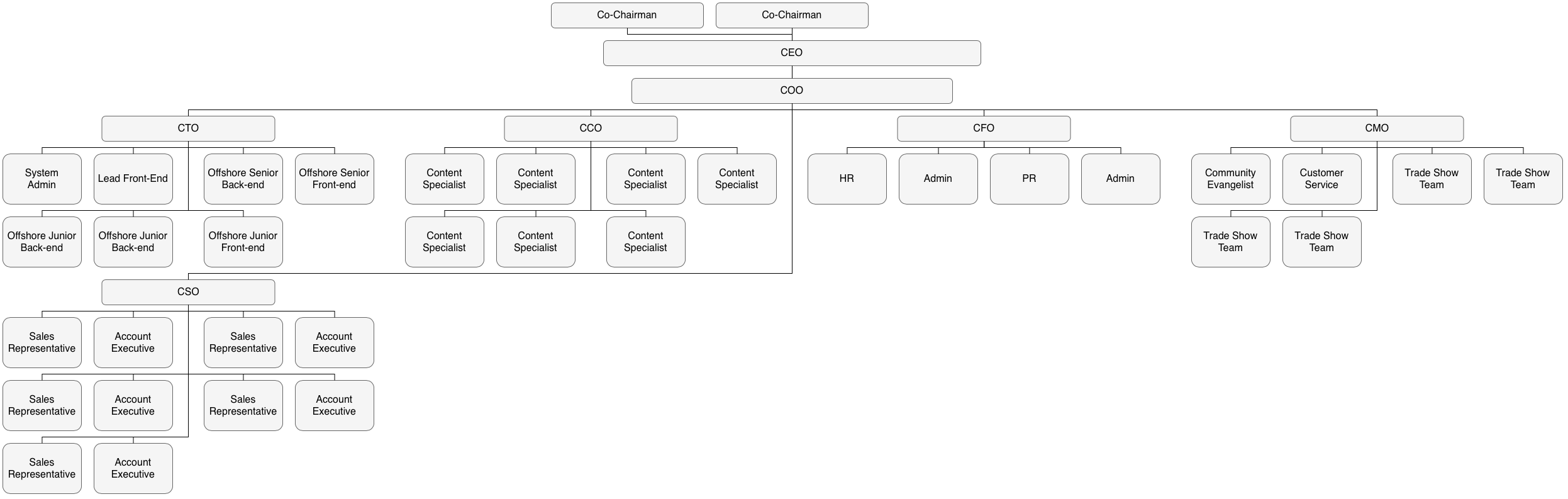
Example org chart layout
The org chart layout using the_ Hanger 4_ type was used to rearrange one of the templates from the draw.io template library.