Select all objects on a layer
- Select a layer in the Layers dialog.
- In the Layers dialog menu, select Current Layer > Select Objects in Layer.
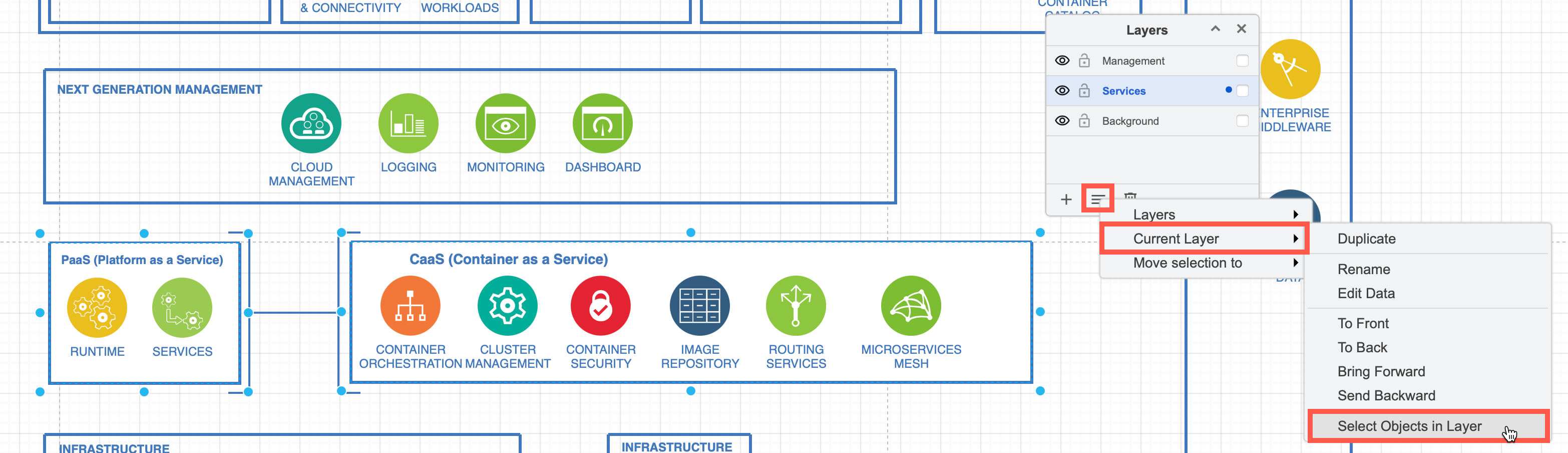
This selects the immediate objects (cells) that are directly under the layer cell. It does not select the objects inside any container shapes or groups in that layer.
When you move container shapes or groups on the drawing canvas, everything inside them moves with them as one entity.
Therefore, when you select objects on a layer and move them to a different layer (Layers dialog menu > Move Selection to), any parent containers or groups will take their objects inside with them to the new layer.
Working with shapes from multiple layers
You can select multiple objects in a diagram from different layers and move them around on the drawing canvas. This does not change what layer they 'live' on.
However, copying objects in a draw.io diagram does not copy their layer information. To copy shapes from multiple layers and retain their layer information, export your selection to an XML file first, then import that file back onto the drawing canvas.